What Rapportive was
Rapportive was a Gmail add-on that showed the LinkedIn profile of the person you were emailing, next to the message. LinkedIn acquired it in 2012 and later shut it down.
What SenderFinder does
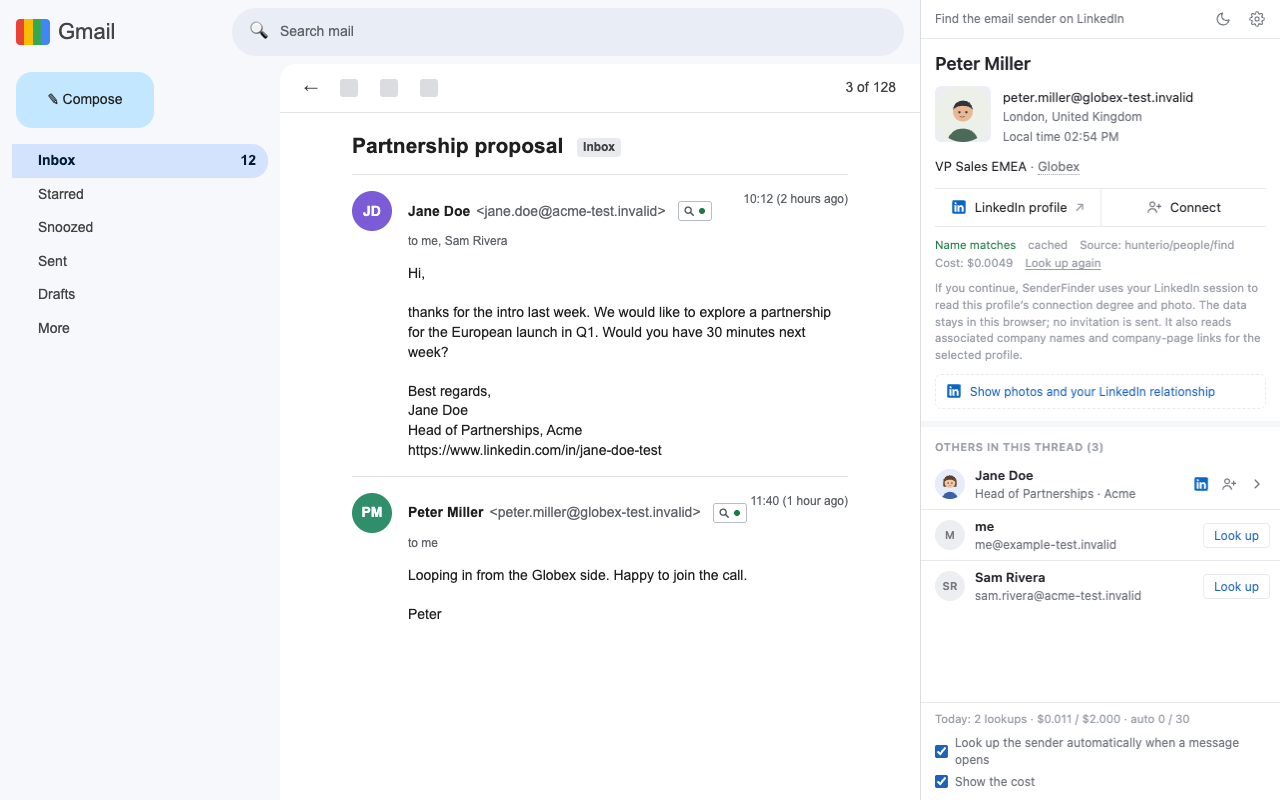
When you open an email in Gmail, the browser's side panel shows the sender's name, headline, company, location and a link to their LinkedIn profile. Other people in the thread (other senders, To, Cc) are listed below and looked up only when you click them. The email itself only gets a small mark next to the sender.
Outlook on the web is supported on a best-effort basis.
What is different
- Open source. AGPL-3.0 licensed, with the code on GitHub. No company can switch it off for you.
- Your own keys. Profiles come from data providers you choose: Monid or treg, with Firecrawl as an optional fallback. The extension calls them directly from your browser.
- No signup. Lookups go directly from your browser to the provider you configure; there is no SenderFinder server in the lookup path. Anonymous daily usage counts are on by default and can be switched off in settings.
- No CRM lock-in. History stays in your browser. Export it as JSON or CSV whenever you want.
- A name check. If the provider's name doesn't match the display name in the email, the result is marked “uncertain” and shows both names.
Honest limitations
- You need a provider key. One key from Monid or treg is enough to start.
- Lookups cost a little. A successful lookup typically costs between $0.0005 and $0.03, usually well under a cent. Misses on most providers are free, and results are cached so an address is never paid for twice.
- Spending has limits you set. A per-lookup cap (default $0.05) and a daily cap (default $2) apply. Only the sender of the opened email is looked up automatically.
- No Firefox yet. It runs in Chrome. Desktop mail apps are not supported.
- Coverage varies. Not everyone will be found, and personal addresses such as gmail.com are skipped by default. A button lets you look them up anyway.
Where the data goes
Rapportive was a hosted service too: the profile lookup ran on its servers, tied to your Rapportive account.
SenderFinder is an open-source Chrome extension. Lookup requests go directly from your browser to the data provider you configure; there is no SenderFinder server in the lookup path. A separate statistics service receives one anonymous daily summary, on by default and switchable off in the settings page. The data controller for those statistics is Tony Li, maintainer of astonysh/SenderFinder. For privacy requests, contact tony@senderfinder.com.
The privacy statement lists exactly what is sent, what is kept and what is discarded.
Get started
- Install the extension. Until the Chrome Web Store listing is live, install it from source.
- Create an API key at Monid or treg.
- Paste it into the extension's settings and open an email in Gmail.
Read how your data is handled in the privacy statement. Coming from Clearbit? See the Clearbit Connect alternative page.